

SmartgridOne logo
SmartgridOne logo
Accessories
AppCertificates
Configuration from A to Z
Control response timeController
Customer Specific
Devices
Boiler
Cloud
Energy Meter
Ev Charging Station
Gas Meter
Heat Pump
New integrations
Plc
Pv Hybrid And Battery Inverters
a-TroniXABB, FIMERADS-TecAforeAlphaESSAmpowrAngileAnklous PV, Hybrid and Battery InvertersAPsystemsAteps Battery
Autarco
BeauventC-BatteryCellpowerChisageDanfossDeltaDET Power PV, Hybrid and Battery InvertersDEYEDiehl-AkoDMEGC InvertersDynessDysun EnergyEcosourcenEenovanceElecnovaEnbrilionEnergreenEnerlutionEnjoyPowersEnphaseEP EquipmentESY InvertersEVEFortona
Foxess
FraxFroniusGoodWeGotionGreener / Alfen
Growatt
HiteHithium
Huawei
Hypontech
Hyxipower
iWellJinkoKacoKehuaKostal
Kstar
MarstekMastervoltMidTeQMotomaOctave EnergyOmniPowerPixiiPower-SonicPoweroadPylontechRefurbRegitecRenonRitarSAJSchneider SunEzySchucoSCUSE2200H till SE6000HSessySigenergySinexcel
Sma
Socomec
Sofar
Solaredge
APISE3.5K untill SE33.3K SeriesSE2200H till SE6000H
SolarlogSolarMaxSolarwattSolaxSolinteg
Solis
Solplanet
Sungrow
SunwaytechSunwoda
Sunwoda
Sus-PowerTeclomanTeploreTesvoltVaconVictronVolstoraWattsNextWeihengXantrexZendure SolarFlowZetaraZeversolar
Switched Loads
Water Meter
External Signals
InstallationLicenseNetworkQuick StartSafety, maintenance and legal noticesSpecificationsStatus LEDs
Toolbox
Troubleshooting
Video tutorialsWiring & connectivity guidelines
DevicesPv Hybrid And Battery InvertersSolaredge
logo

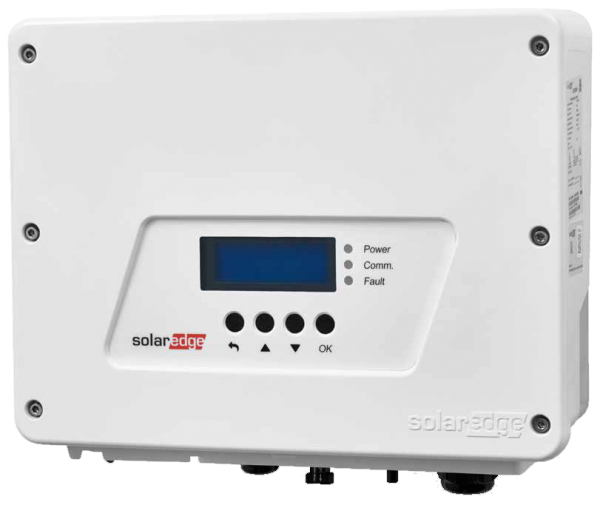
SolarEdge SE2200H - SE6000H inverters

Supported Devices
Image
Device TypeModbus TCP (Ethernet)RS485CurtailmentMinimum device firmware version
SolarEdge SE2200H✅✅🔶 (see warning below)v3.0 (Tip: if the SolarEdge SetApp works, the firmware will be recent enough)
SolarEdge SE3000H
SolarEdge SE3500H
SolarEdge SE3680H
SolarEdge SE4000H
SolarEdge SE5000H
SolarEdge SE6000H
Warning
Warning

CURTAILMENT IS ONLY SUPPORTED AFTER OBTAINING AN AGREEMENT WITH SOLAREDGE

If curtailment is not working on your SolarEdge device, it is probably not enabled by SolarEdge. Reach out to SolarEdge to enable control of your devices. [!WARNING] SolarEdge refuses to help customers with curtailment!

Wiring

For correct ethernet wiring: Follow the the guidelines for ethernet wiring.

Configuration

Activating Modbus TCP communication

In the menu, navigate to "Communication" -> "LAN Conf" -> "Modbus TCP", and activate Modbus TCP.

When Modbus TCP is activated, the following status screen will be displayed:

Modbus TCP: <status>

IP:192.168.1.210

Port:502

SE3.5K untill SE33.3K Series

Previous Page

Solarlog

Solar-Log Gateways & PV inverters

On this page

SolarEdge SE2200H - SE6000H invertersSupported DevicesCURTAILMENT IS ONLY SUPPORTED AFTER OBTAINING AN AGREEMENT WITH SOLAREDGEWiringConfigurationActivating Modbus TCP communication