

SAJ
Supported Devices
| Device Type | Modbus TCP (Ethernet) | RS485 | Curtailment |
|---|---|---|---|
| SAJ H2 series-5k-30k | ✅ | ✅ | ✅ |
| SAJ HS2 series-5k-10k | |||
| SAJ CHS2 | |||
| SAJ AS2 | ❌ |
Configuration
1: Physical Connection Setup
For Ethernet Connection:
- Locate the communication interface on your SAJ inverter
- Connect an ethernet cable between the inverter and your local network
- Follow the ethernet wiring guidelines for proper installation
For RS485 Connection:
- Locate the RS485 port on your SAJ inverter
- Connect the RS485 cable according to the following pinout:
- PIN A: RS485+
- PIN B: RS485-
- GND: Ground (if available)
2: Network Configuration
- By default, the inverter is set to obtain an IP address automatically via DHCP
- If using a static IP configuration:
- Access the inverter's web interface
- Navigate to Network Settings
- Configure the IP address, subnet mask, and gateway as needed
3: Communication Settings
For optimal performance, ensure the following communication parameters:
- Modbus TCP port: 502 (default)
- RS485 baud rate: 9600
- Data bits: 8
- Stop bits: 1
- Parity: None
Wiring
Ethernet Connection
- Use CAT5e or CAT6 ethernet cable
- Maximum cable length: 100 meters
- Follow the guidelines for ethernet wiring
RS485 Connection
- Use shielded twisted pair cable
- Maximum cable length: 1000 meters
- Connect the shield to ground at one end only
- Maintain proper RS485 bus topology
eSAJ Home settings
| Step | Image |
|---|---|
| Open ESAJ Home and connect to the inverter | |
| Select SAJ in battery settings and click Save after the change | 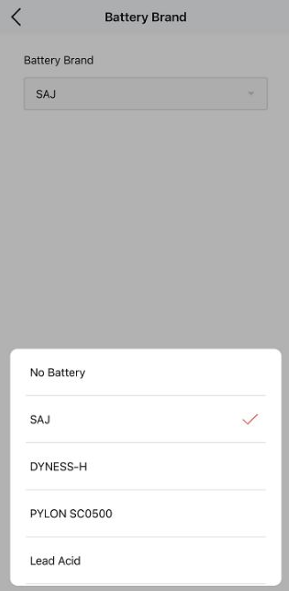 |
| Click initialization and select grid for the country | 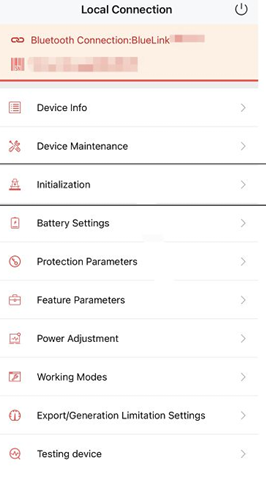 |
| Disable Export limitation (if it is enabled power from the inverter cannot be fed into the grid). | 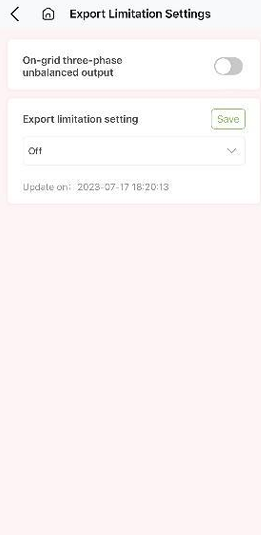 |
Troubleshooting
Common issues and solutions:
-
No Communication
- Check physical connections
- Verify network settings
- Ensure proper Modbus address configuration
-
Intermittent Connection
- Check cable quality and connections
- Verify there's no electromagnetic interference
- Ensure proper cable routing