

Kehua
Appareils pris en charge
| Device Type | Modbus TCP (Ethernet) | RS485 |
|---|---|---|
| BCS1725K-B-HUD | ✅ | ✅ |
| NXPCS | ||
| BCS200K-B-HM | ||
| SPI three-phase string PV series (SPI8000/12K/23K/33K-B X2, SPI125K-B, SPI250K/320K-B-H) | ❌ |
Câblage
Pour un câblage Ethernet correct : suivez les directives de câblage Ethernet.
RS485
Modèles PCS (BCS1725K-B-HUD, NXPCS, BCS200K-B-HM)
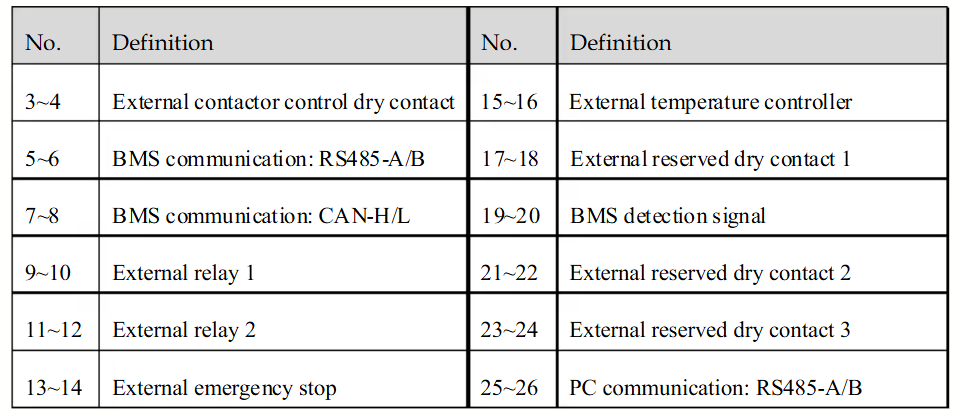
Pour établir la communication entre le PCS et Controller, utilisez l’interface RS485 disponible sur le bornier de câblage externe, comme illustré ci-dessous. Ce bornier fournit des ports dédiés à la communication RS485, utilisée pour les connexions au PC et au BMS.
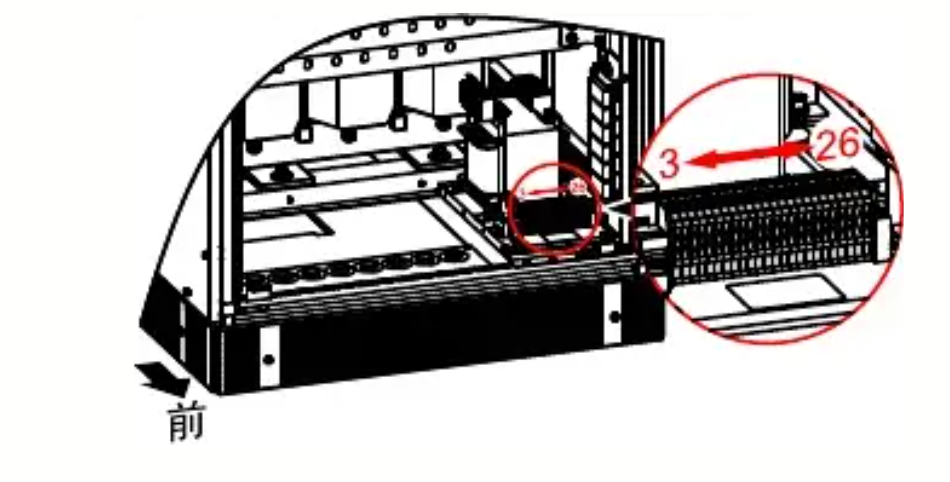
RS485 Wiring
- For correct RS485 wiring: Follow the guidelines for RS485 wiring.
- If the wiring shown in the table below is incorrect, please let us know.
- There is no general consensus in the industry about the usage of A and B for the RS485 polarity, so it may be counterintuitive and opposite of what you might expect for some devices.
| Device | SmartgridOne Controller model OM1 | SmartgridOne Controller model IG8 | RS485-USB converter | RS485-Ethernet converter |
|---|---|---|---|---|
| RS485 A (Pin 5) | RS485 A | RS485_POS | RS485 A | TX+ |
| RS485 B (Pin 6) | RS485 B | RS485_NEG | RS485 B | TX- |
| N/A | RS GND | GND | Not available | G |
Onduleurs photovoltaïques string SPI
Les onduleurs photovoltaïques string SPI utilisent une connexion RS485 physique différente de celle des modèles PCS ci-dessus. Les paramètres série sont les mêmes pour tous les modèles SPI :
| Paramètre | Valeur |
|---|---|
| Protocole | Modbus RTU |
| Débit en bauds | 9600 (par défaut), configurable à 2400 / 4800 / 19200 / 38400 / 115200 |
| Parité | Aucune |
| Bits de données | 8 |
| Bits d’arrêt | 1 |
| Adresse Modbus | 1 - 247 |
Série SPI-B X2 (SPI8000-B-X2 jusqu’à SPI33K-B X2)
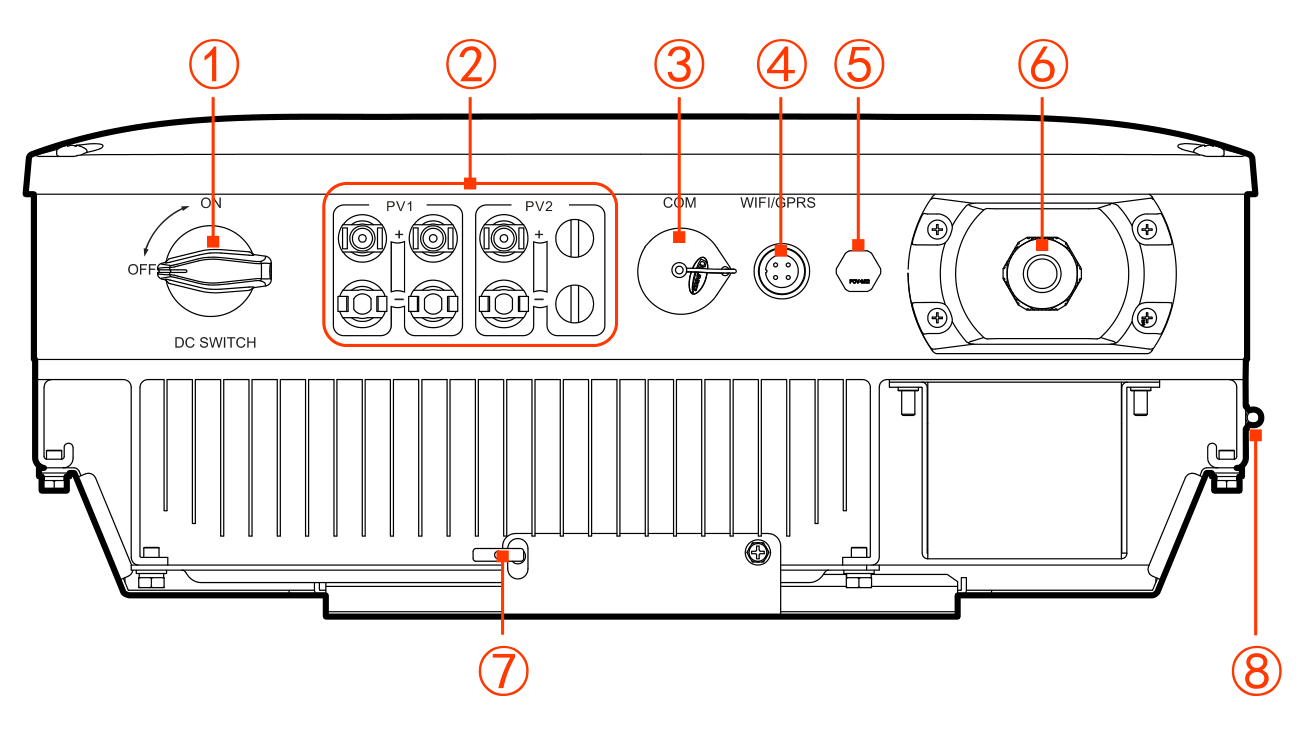
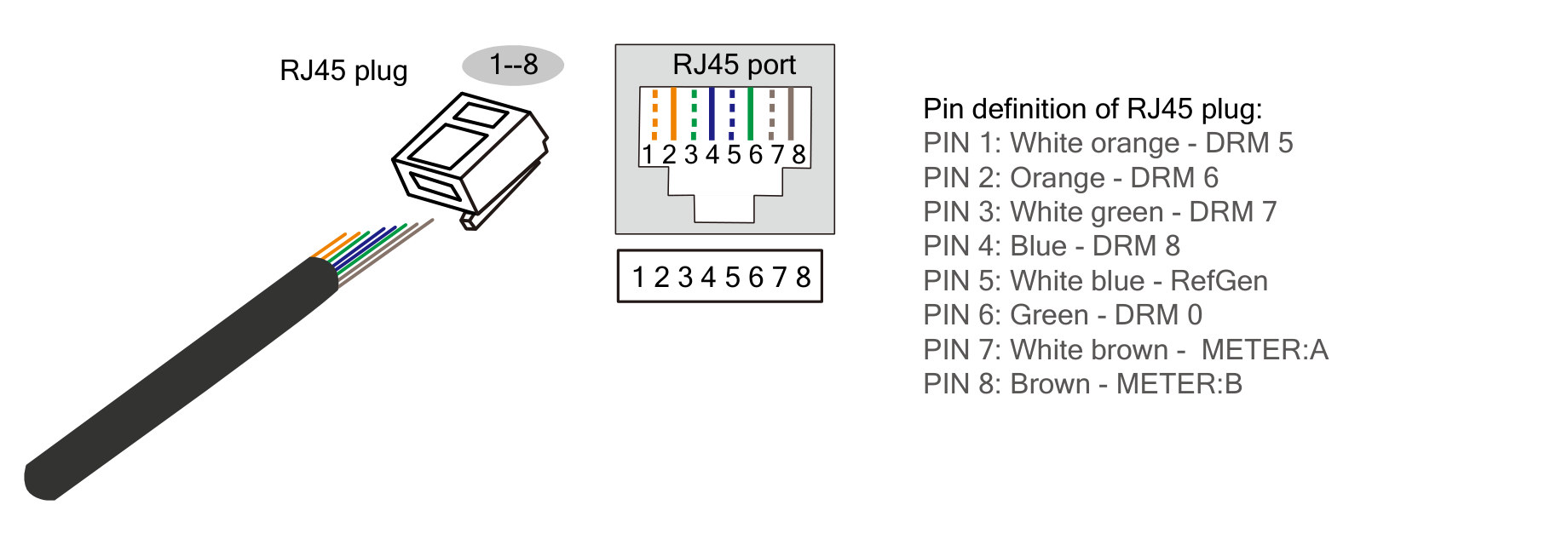
Le port COM. (une prise RJ45 étanche, ③ sur la figure ci-dessous) est la seule interface RS485 câblée de ces modèles. Il doit être configuré comme port de communication RS485 (et non comme port DRM). Les broches 7 et 8 de la prise RJ45 correspondent aux lignes RS485 A et B.
RS485 Wiring
- For correct RS485 wiring: Follow the guidelines for RS485 wiring.
- If the wiring shown in the table below is incorrect, please let us know.
- There is no general consensus in the industry about the usage of A and B for the RS485 polarity, so it may be counterintuitive and opposite of what you might expect for some devices.
| Device | SmartgridOne Controller model OM1 | SmartgridOne Controller model IG8 | RS485-USB converter | RS485-Ethernet converter |
|---|---|---|---|---|
| RS485 A (RJ45 pin 7, white-brown) | RS485 A | RS485_POS | RS485 A | TX+ |
| RS485 B (RJ45 pin 8, brown) | RS485 B | RS485_NEG | RS485 B | TX- |
| N/A | RS GND | GND | Not available | G |
Important — vérifiez sur site : les manuels d’utilisation Kehua identifient les broches 7 et 8 comme METER:A / METER:B et les décrivent uniquement pour la fonction de compteur intelligent (zéro injection). Le protocole Modbus nord de Kehua (V2.11) répertorie bien ces modèles comme prenant en charge la surveillance RS485, et ce RJ45 est leur seule interface RS485 câblée, mais la documentation Kehua ne confirme pas explicitement que la surveillance utilise ces broches. Vérifiez cette connexion sur site ou auprès du support Kehua avant de vous y fier. Notez également que si la fonction de compteur intelligent zéro injection est utilisée, ce port est occupé par le compteur et ne peut pas être utilisé simultanément pour la surveillance.
L’adresse Modbus et le débit en bauds de ces modèles sont définis avec le logiciel de surveillance Kehua (débit par défaut : 9600). Plusieurs onduleurs peuvent être connectés en série sur le même bus RS485.
Modèles SPI de plus grande puissance (SPI125K-B, SPI250K-B-H, SPI320K-B-H)
Ces modèles disposent d’un port RS485 dédié sur la carte de communication située à l’intérieur du boîtier de câblage ; le manuel d’utilisation Kehua confirme que ce port « est principalement utilisé pour la surveillance via LAN, ce qui permet la surveillance à distance en arrière-plan ». Connectez les fils RS485 à ce port et acheminez-les séparément du câblage d’alimentation AC et DC afin d’éviter les interférences de communication.
RS485 Wiring
- For correct RS485 wiring: Follow the guidelines for RS485 wiring.
- If the wiring shown in the table below is incorrect, please let us know.
- There is no general consensus in the industry about the usage of A and B for the RS485 polarity, so it may be counterintuitive and opposite of what you might expect for some devices.
| Device | SmartgridOne Controller model OM1 | SmartgridOne Controller model IG8 | RS485-USB converter | RS485-Ethernet converter |
|---|---|---|---|---|
| RS485 A | RS485 A | RS485_POS | RS485 A | TX+ |
| RS485 B | RS485 B | RS485_NEG | RS485 B | TX- |
| N/A | RS GND | GND | Not available | G |
- Sur les modèles SPI 75K-150K (par ex. SPI125K-B), l’adresse Modbus est définie en binaire à l’aide du commutateur rotatif SW1 situé sur la carte de communication (par ex.
000001= adresse 1). Le débit en bauds est défini avec le logiciel Kehua WiseEnergy (9600 par défaut). - Sur les modèles SPI-B-H (SPI250K-B-H, SPI320K-B-H), la connexion RS485 se trouve dans le boîtier de câblage COM., à côté de la connexion Ethernet (en option).