

Onduleurs Dyness
Important
Important
Actuellement, pour l’intégration des armoires C&I avec MPPT, le SOC maximal est limité à 95 % afin de permettre au photovoltaïque de continuer à alimenter la charge.
Appareils pris en charge
| Device Type | Variants | Modbus TCP (Ethernet) | RS485 | Curtailment |
|---|---|---|---|---|
| DH100F | 71~100kWh | ✅ | ✅ | ✅ |
| DH200F | 100kW/215kWh | |||
| DH200Y | 100kW/232kWh | |||
| LS | ||||
| HT-A | ||||
| DH800Y | ⚠️ this feature has yet to be tested |
Câblage
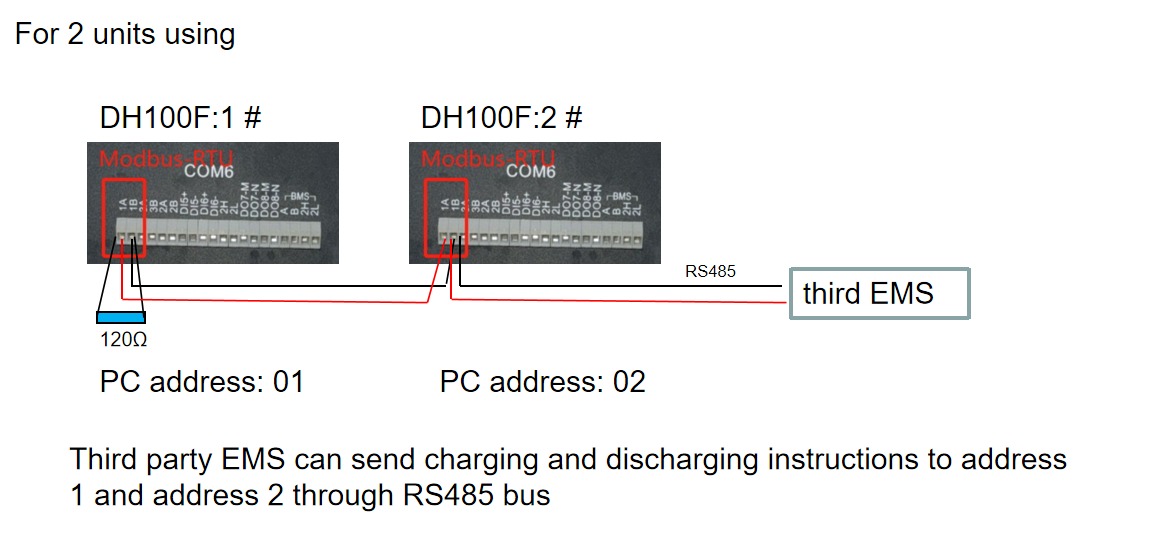
Le SmartgridOne Controller et les onduleurs Dyness communiquent via RS485 ou Ethernet.
Ethernet
Pour un câblage Ethernet correct : suivez les directives de câblage Ethernet.
RS485
Info
RS485 Wiring
- For correct RS485 wiring: Follow the guidelines for RS485 wiring.
- If the wiring shown in the table below is incorrect, please let us know.
- There is no general consensus in the industry about the usage of A and B for the RS485 polarity, so it may be counterintuitive and opposite of what you might expect for some devices.
| Device | SmartgridOne Controller model OM1 | SmartgridOne Controller model IG8 | RS485-USB converter | RS485-Ethernet converter |
|---|---|---|---|---|
| COM6 terminal 1A | RS485 A | RS485_POS | RS485 A | TX+ |
| Com6 terminal 1B | RS485 B | RS485_NEG | RS485 B | TX- |
| N/A | RS GND | GND | Not available | G |
Configuration
DH100F
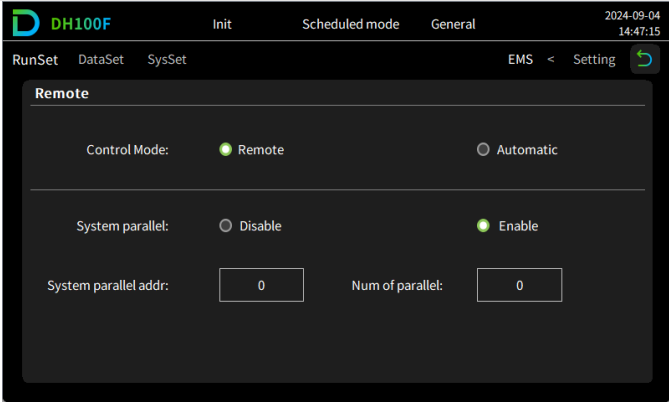
Le Dyness DH100F doit être configuré en mode distant :
- Cliquez sur l’icône du menu principal dans le coin supérieur droit de l’interface principale
- Cliquez sur « Data » dans la barre du menu principal
- Cliquez sur « EMS » dans la barre du sous-menu
- Cliquez sur « RunSet » dans la partie supérieure gauche de la barre de navigation
- Réglez le mode de contrôle sur « Remote »
Avertissement
NOTE: RS485 Device Addresses
- You MUST give each device on the RS485 bus a unique address. Check the manual of the device on how to do this.
- Use lower addresses first (1, 2, ...) because the SmartgridOne Controller will find them faster!
- For each device, it is generally recommended to stick with the factory default baud rate, parity, and stop bits. The SmartgridOne Controller will scan on those first.
Last updated August 24, 2026Edit this page