

SmartgridOne logo
SmartgridOne logo
Accessories
AppCertificates
Configuration from A to Z
Control response timeController
Customer Specific
Devices
Boiler
Cloud
Energy Meter
Ev Charging Station
a-TroniXABBAlfenAlpitronicAmtronAutelBlitz-PowerEaseeEnovatesEtrelFLEXeCHARGEGo-eHuawei SChargerIlumenKempowerMyEnergi EV Charging StationsOCPPPeblar EV Charging StationsRaedianSchneider ElectricSiemensSMASofarTeltonika EV Charging StationsVolt-TimeVoolWallbox EV Charging StationsZaptecZDK Booster
Gas Meter
Heat Pump
New integrations
Plc
Pv Hybrid And Battery Inverters
Switched Loads
Water Meter
External Signals
InstallationLicenseNetworkQuick StartSafety, maintenance and legal noticesSpecificationsStatus LEDs
Toolbox
Troubleshooting
Video tutorialsWiring & connectivity guidelines
DevicesEv Charging Station
Wallbox

Wallbox EV Charging Stations

Supported Devices

Device TypeVariantsCloud APIModbus TCP (Ethernet)RS485
PulsarPlus/Max/Pro✅❌❌
eM4All
Quasar 2
Commander
Copper SB
Supernova❌✅

Connection

The communication between the SmartgridOne Controller and the Wallbox EV Charging Stations is established through API and Modbus TCP. No physical cables are required to the SmartgridOne Controller.

Settings

Pulsar | eM4 | Quasar 2

No additional settings have to be made on the Wallbox side.

Supernova
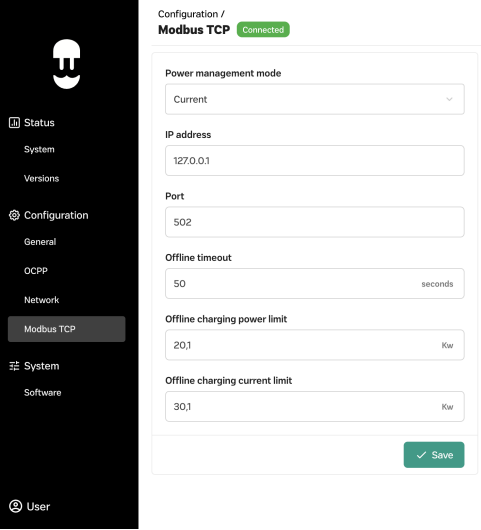
Supernova Settings
  1. Open the WebManager of the Supernova
  2. Go to "Configuration" > "Modbus TCP"
  3. Set the "Power Management Mode" to "Current"
  4. Set a static IP address for the Supernova
  5. Set the "Port" to "502"
  6. Save the settings

Vool

Previous Page

Zaptec

Next Page

On this page

Wallbox EV Charging StationsSupported DevicesConnectionSettingsPulsar | eM4 | Quasar 2Supernova