
TODO: Det ser ud til, at dette gælder for flere invertere?

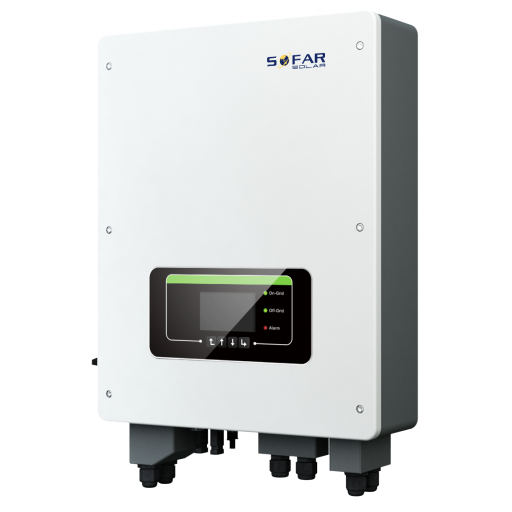
Sofar TL-G3 og TLM/X-G3 Serie Invertere
Understøttede Enheder
| Device Type | Modbus TCP (Ethernet) | RS485 | Curtailment |
|---|---|---|---|
| ... | ✅ | ✅ | ✅ |
Advarsel
Advarsel
- De fleste enheder kan kommunikere via modbus TCP. Dette gælder ikke for serien "SOFAR 1...40KTL"
- Nogle invertere kræver specifik firmware, som kun er tilgængelig for visse distributører. Kontakt din distributør ved tvivl.
Kabelføring
Ethernet
Tilslut inverteren til dit internetnetværk ved hjælp af "SOFAR SOLAR ETHERNET STICK LSE3".
For korrekt ethernet-kabling: Følg retningslinjerne for ethernet-kabling.
RS485
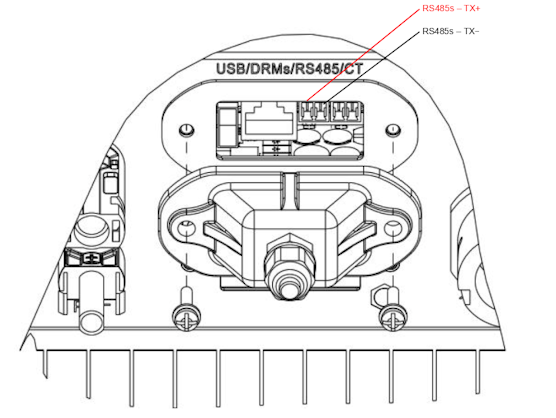
...TL-G3 & G1 & G2
Info
RS485 Wiring
- For correct RS485 wiring: Follow the guidelines for RS485 wiring.
- If the wiring shown in the table below is incorrect, please let us know.
- There is no general consensus in the industry about the usage of A and B for the RS485 polarity, so it may be counterintuitive and opposite of what you might expect for some devices.
| Device | SmartgridOne Controller model OM1 | SmartgridOne Controller model IG8 | RS485-USB converter | RS485-Ethernet converter |
|---|---|---|---|---|
| RS485s TR+ | RS485 A | RS485_POS | RS485 A | TX+ |
| RS485s TR- | RS485 B | RS485_NEG | RS485 B | TX- |
| N/A | RS GND | GND | Not available | G |
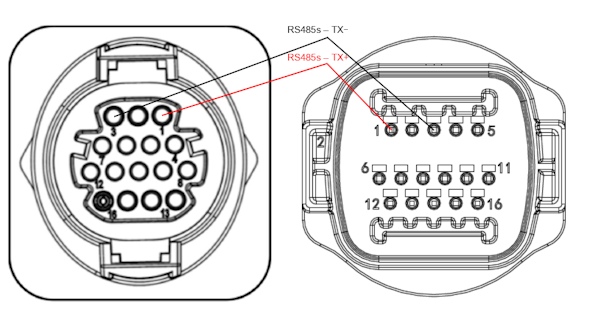
...TLX & TLM
Info
RS485 Wiring
- For correct RS485 wiring: Follow the guidelines for RS485 wiring.
- If the wiring shown in the table below is incorrect, please let us know.
- There is no general consensus in the industry about the usage of A and B for the RS485 polarity, so it may be counterintuitive and opposite of what you might expect for some devices.
| Device | SmartgridOne Controller model OM1 | SmartgridOne Controller model IG8 | RS485-USB converter | RS485-Ethernet converter |
|---|---|---|---|---|
| RS485s TR+ (pin 1) | RS485 A | RS485_POS | RS485 A | TX+ |
| RS485s TR- (pin 3) | RS485 B | RS485_NEG | RS485 B | TX- |
| N/A | RS GND | GND | Not available | G |
Konfiguration
RS485
Advarsel
NOTE: RS485 Device Addresses
- You MUST give each device on the RS485 bus a unique address. Check the manual of the device on how to do this.
- Use lower addresses first (1, 2, ...) because the SmartgridOne Controller will find them faster!
- For each device, it is generally recommended to stick with the factory default baud rate, parity, and stop bits. The SmartgridOne Controller will scan on those first.
Ekstern inverterstyring skal aktiveres i inverterens konfigurationsmenu via LCD-skærmen.
- Tryk kort på knappen ned.
- Du vil se "1. Enter settings", tryk på knappen ned i 2 sekunder for at gå ind i indstillingerne.
- Gennemgå indstillingerne, indtil du ser:
- Modbus Address eller
- Set ComProtocol
- Tryk på knappen ned i 2 sekunder for at indstille adressen.
- Indstil adressen til den ønskede værdi.