
Reactive power control
Warning
Warning
Reactive power control is only possible with certain device brands. Contact your reseller for more information.
Enabling reactive power control
In the commissioning interface, go to the "Settings" tab, scroll down to "Advanced Settings" and open the Advanced Settings.
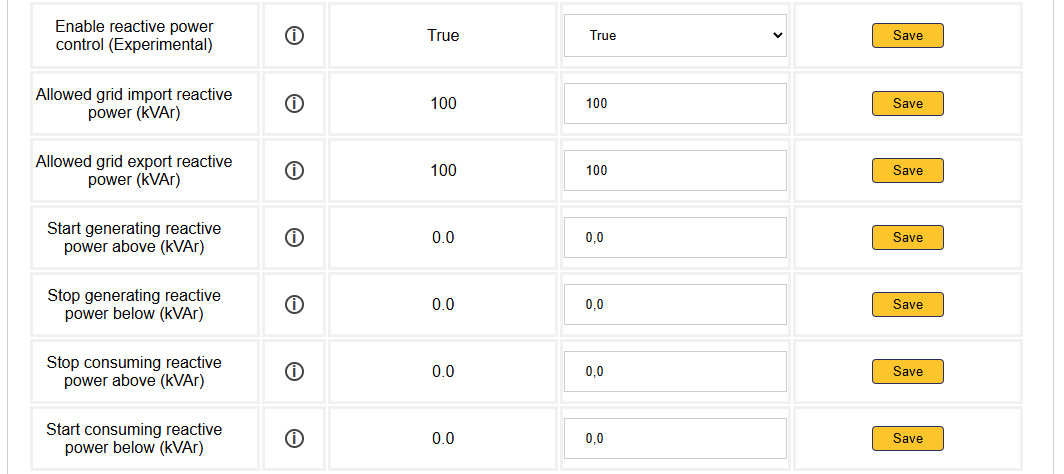
Here you can Enable reactive power control. When reactive power control is enabled, a few options will appear.
Grid limits
- Allowed grid import reactive power (kVAr): Maximum kVAr that may be imported from the grid.
- Allowed grid export reactive power (kVAr): Maximum kVAr that may be exported to the grid.
Reactive power peakshaving settings
- Start generating reactive power above (kVAr): When the imported grid reactive power rises above this value, the inverters will start producing reactive power to limit the grid reactive power to this value.
- Stop generating reactive power below (kVAr): When the imported grid reactive power drops below this value, the inverters will stop producing reactive power.
- Stop consuming reactive power above (kVAr): When the imported grid reactive power rises below this value, the inverters will stop consuming reactive power.
- Start consuming reactive power below (kVAr): When the exported grid reactive power goes below this value, the inverters will start consuming reactive power to limit the grid reactive power to this value.
The reactive power peak shaving settings are similar to the settings for peak shaving of active power.
Tip
Tip
Reactive power compensation To aim towards complete reactive power compensation, set all the reactive power peak shaving settings to zero.
Last updated December 11, 2025Edit this page