

Inwertery Dyness
Ważne
Ważne
Obecnie integracja obsługuje do limitu stanu naładowania wynoszącego 95%. Dzieje się tak, ponieważ gdy stan naładowania przekracza 95%, bateria może przestać reagować na punkty nastawy z powodu działania systemu zarządzania baterią. Pracujemy nad rozwiązaniem tego problemu wspólnie z Dyness i innymi partnerami.
Obsługiwane urządzenia
| Device Type | Variants | Modbus TCP (Ethernet) | RS485 | Curtailment |
|---|---|---|---|---|
| EC100 | 100kWh | ✅ | ✅ | ✅ |
| DH100F | 71~100kWh | |||
| DH200F | 100kW/215kWh | |||
| DH200Y | 100kW/232kWh | |||
| LS | ||||
| HT-A | ||||
| DH800Y | ⚠️ ta funkcja nie została jeszcze przetestowana |
Okablowanie
SmartgridOne Controller oraz inwertery Dyness komunikują się za pomocą RS485 lub Ethernetu.
Ethernet
Aby poprawnie wykonać okablowanie ethernetowe: Postępuj zgodnie z wytycznymi dotyczącymi okablowania ethernet.
RS485
Informacja
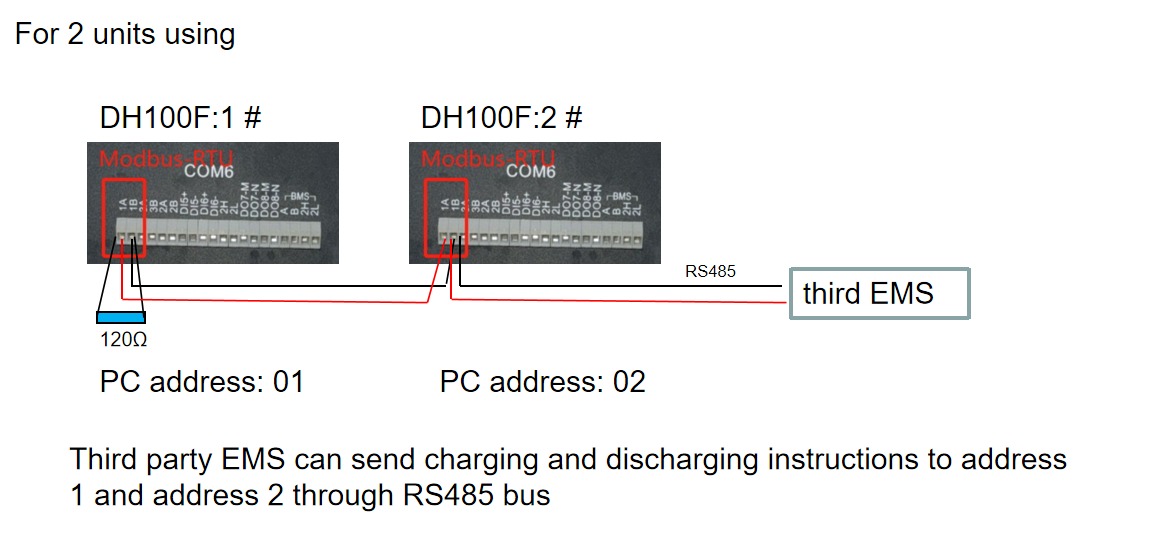
RS485 Wiring
- For correct RS485 wiring: Follow the guidelines for RS485 wiring.
- If the wiring shown in the table below is incorrect, please let us know.
- There is no general consensus in the industry about the usage of A and B for the RS485 polarity, so it may be counterintuitive and opposite of what you might expect for some devices.
| Device | SmartgridOne Controller model OM1 | SmartgridOne Controller model IG8 | RS485-USB converter | RS485-Ethernet converter |
|---|---|---|---|---|
| COM6 terminal 1A | RS485 A | RS485_POS | RS485 A | TX+ |
| Com6 terminal 1B | RS485 B | RS485_NEG | RS485 B | TX- |
| N/A | RS GND | GND | Not available | G |
Konfiguracja
DH100F
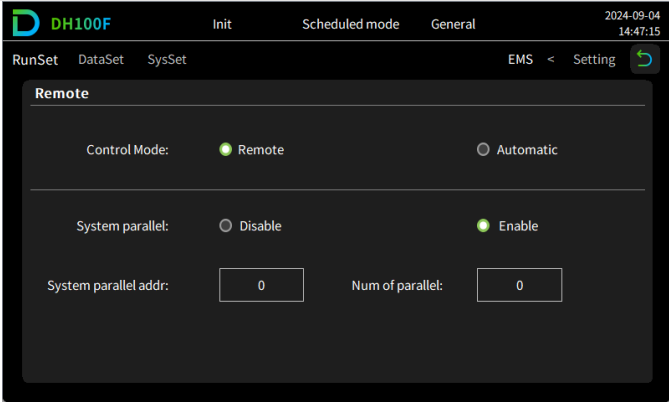
Inwerter Dyness DH100F musi być ustawiony w tryb zdalny:
- Kliknij ikonę głównego menu w prawym górnym rogu głównego interfejsu
- Kliknij „Data” na pasku głównego menu
- Kliknij „EMS” na pasku podmenu
- Kliknij „RunSet” w lewym górnym rogu paska nawigacyjnego
- Ustaw tryb sterowania na „Remote”
Ostrzeżenie
NOTE: RS485 Device Addresses
- You MUST give each device on the RS485 bus a unique address. Check the manual of the device on how to do this.
- Use lower addresses first (1, 2, ...) because the SmartgridOne Controller will find them faster!
- For each device, it is generally recommended to stick with the factory default baud rate, parity, and stop bits. The SmartgridOne Controller will scan on those first.
Last updated August 13, 2026Edit this page